
Finance and balance
A summary of the partner's rides and money, platform invoices, and how they relate to driver balances. Contract amounts and bank details are not given in this guide — only the general rules.
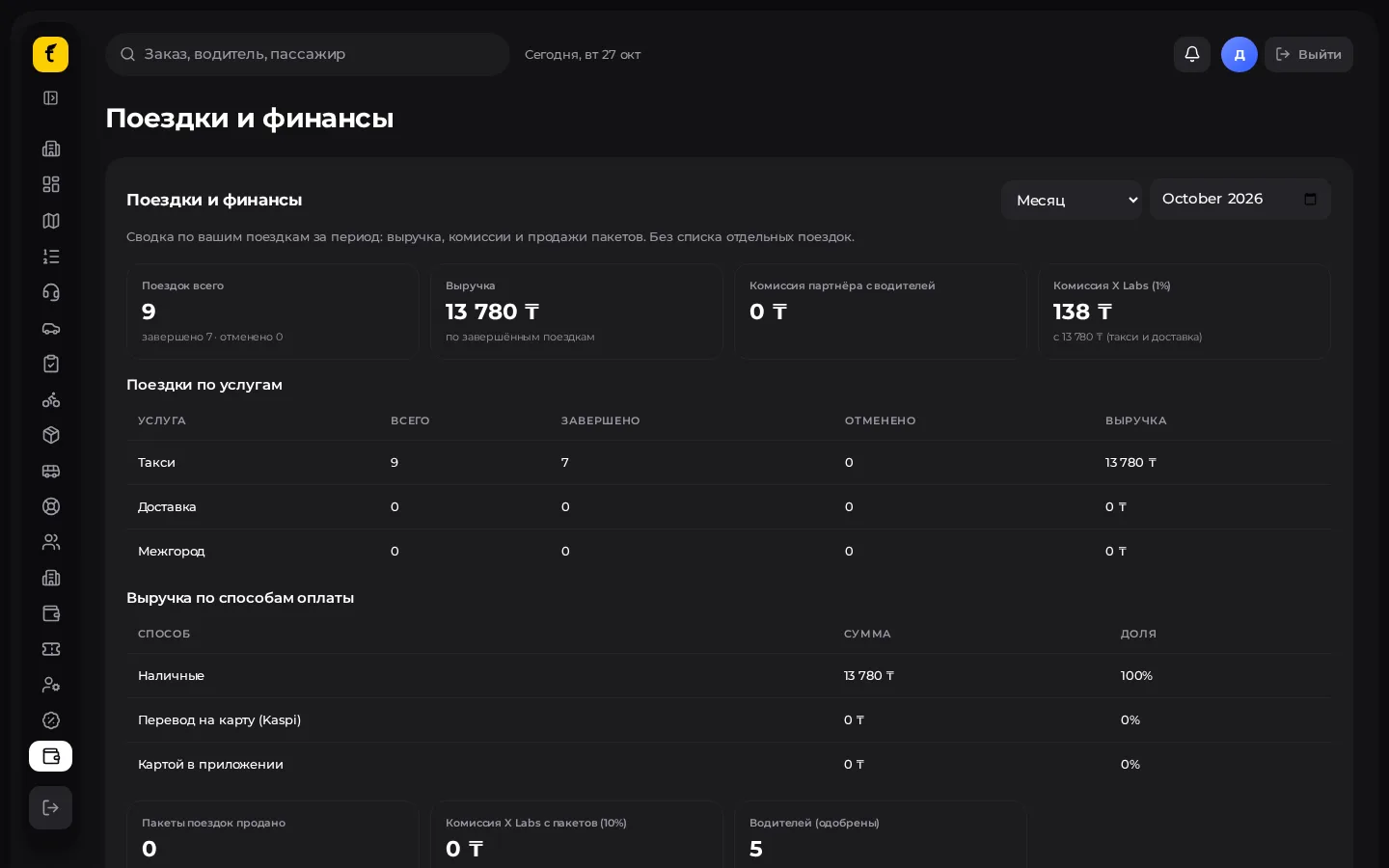
Opening the section
Menu → Rides and finance («Поездки и финансы») in the partner cabinet, or Finance («Финансы») in the extended menu.
Summary for a period
- Choose a period: month or your own date range.
- Look at the tiles:
- rides total / completed / cancelled;
- revenue from completed rides;
- partner commission from drivers;
- platform commission (royalty) for the period;
- package sales and related platform charges;
- number of approved / active drivers.
- Below is a breakdown by service (taxi / delivery / intercity) and by payment method.
1% royalty (in general terms)
The platform charges a royalty (platform commission) of 1% on rides actually completed (the base and the services included depend on your connection and the invoices in the cabinet).
- The summary shows the percentage and amount in a separate tile.
- Some deductions may go through drivers and are not included in the partner's invoice — such lines are marked as reference only.
- For the month's final figures use the issued invoice, not just the live tile.
The exact formula, exceptions and payment terms are in the partner agreement and its annexes, not in this knowledge base.
Franchise fee (in general terms)
When a city is connected, a franchise fee (one-off or periodic under the contract) is charged for the right to work as the exclusive partner in the city.
- The amount and schedule are set by the contract, not by the cabinet screen.
- The cabinet usually does not add the fee as a percentage of each ride — it is a separate term of cooperation.
- Questions about invoicing and paying the franchise fee go to the platform manager / per the contract.
Platform invoices
- Open the list of invoices (monthly platform commission invoices).
- Statuses: issued («выставлен») / paid («оплачен»).
- Open an invoice → Print / PDF («Печать / PDF») to pay using the details in the document.
- After payment the platform updates the status (or an authorised employee marks it).
Details on the invoice
If the contractor's details on the invoice are empty, use the official invoice from the platform.
Driver balances and payouts
The platform's full finance section (if your role has access) includes:
- driver and courier balances;
- payout requests;
- top-up invoice requests from drivers.
The partner administrator handles top-ups and payouts according to the partner's internal rules. Don't confuse the driver balance with the platform royalty invoice.
Month-end practice
- Wait for the period to end (time zone — Astana / Almaty).
- Check the summary against the number of completed rides.
- Download / print the platform invoice.
- Pay under the contract; keep the payment order.
- If there is a discrepancy, send the platform the invoice number and period — without posting internal credentials in chats.